Mostrando entradas con la etiqueta power builder. Mostrar todas las entradas

lunes, 24 de julio de 2017


CheckBox, RadioButton y HProgressBar en Power Builder 12.0

hola sean bienvenidos a este blog de programación
bueno en esta entrada les compartiré ejercicios en power builder 12.0 uso del control checkbox
uso de fechas y horas.

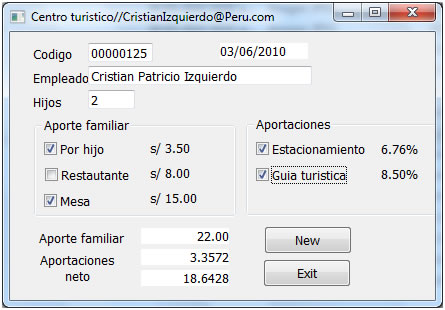
Se desea calcular aporte familiar,estacionamiento en un centro turístico

Diseño de nuestro formulario es lo siguiente


codigo:
Function


int hijo,rest,mesa,total,cantidad
double estacio,gturista,tot
cantidad=integer(sle_hi.text)


if cbx_xhijo.checked=true then hijo=3.50*cantidad
if cbx_resta.checked=true then rest=8
if cbx_mbillar.checked=true then
            mesa=15
total=hijo+rest+mesa
st_aporte.text=string(total)


if cbx_estacio.checked=true  then estacio=total*0.0676
if cbx_gturistica.checked=true then gturista=total * 0.085
tot=estacio+gturista
st_aportaciones.text=string(tot)

end if
st_neto.text=string(total -tot)


BOTON NUEVO
sle_cod.text=""
sle_empleado.text=""
sle_hi.text=""
st_aporte.text=""
st_aportaciones.text=""
st_neto.text=""
sle_codigo.setfocus()

EVENTO (Activate) formulario
st_fecha.text=string(today())

EVENTO (Modified)
Long s_nombre
 string fi
 s_nombre=Len(sle_codigo.text)
fi= Fill ("0",5)
sle_codigo.text=string(fi)+(sle_codigo.text)
sle_empleado.setfocus()



Share:

sábado, 8 de julio de 2017


Promedio de notas de un alumno en power builder 12.0

hacer promedio de notas de un alumno  en power builder 12.0

1. diseñar el formulario como la imagen siguiente.


2. codigo fuente.


Function

integer v,s,j,p,promedio
string nivel,condi
v=integer(sle_visual.text)
s=integer(sle_sql.text)
j=integer(sle_java.text)
p=integer(sle_power.text)
promedio= integer(v+s+j+p)/4
st_promedio.text=string(promedio)


choose case promedio
            case 0 to 7
            nivel="pesimo"
            case  8 to 12
            nivel ="bajo"
            case 13 to 14
            nivel="regular"
            case 15 to 19
            nivel="bueno"
            case 20
            nivel="excelente"
            end choose
st_nivel.text=string(nivel)

choose case  promedio
case 0 to 10
condi="Desaprobado"          
case 11 to 20
condi="Aprobado"
end choose
st_condicion.text=string(condi)


Codigo boton new

sle_codigo.text=""
sle_alumno.text=""
sle_edad.text=""
sle_visual.text=""
sle_sql.text=""
sle_java.text=""
sle_power.text=""
st_promedio.text=""
st_condicion.text=""
st_nivel.text=""
sle_codigo.setfocus()

Escribe tu comentario sugerencias o consultas aqui abajo gracias

espero ayudarte..


Share:
 

Boleta de ventas en power builder 12.0

USO DE CONTROL LISTBOX Y DROPDOWNLISTBOX
Boleta de ventas en power builder 12.0

1. Diseña el formulario como la imagen


2 Codigo fuente


st_fecha.text=string(today())
st_hora.text=string(now())
//st_fecha.text=string(time())
lb_lista.additem("Piura")
lb_lista.additem("Tacna")
lb_lista.additem("Amazonas")
lb_lista.additem("Arequipa")
lb_lista.additem("Puno")
lb_lista.additem("Cuzco")
//carga des cuentos
ddplb_descuento.additem("2")
ddplb_descuento.additem("3")
ddplb_descuento.additem("4")
ddplb_descuento.additem("5")
ddplb_descuento.additem("6")
ddplb_descuento.additem("7")
ddplb_descuento.additem("8")
ddplb_descuento.additem("9")

function
double p,des,extra,a,b
choose case lb_lista.selectedindex()
                case 1
                               p=118
                               case 2
                                               p=165
                               case 3
                                               p=120
                               case 4
                                               p=140
                               case 5
                                               p=150
                                               case 6
                                               p=160
                end choose
               
                st_costo.text=string(p,"##0.00")
                               a=double(st_costo.text)*double(em_cantidad.text)
                               b=double(a)*double(ddplb_descuento.text)/100
                               st_des.text=string(b,"##0.00")
                st_netopagar.text=string(double(a)-double(st_des.text),"##0.00")


Share:

viernes, 7 de julio de 2017


Planilla de empleados en power builder 12.0

En este post les comparto un aticulo con codigo fuente de planilla de empleados


  1. Diseña el siguiente formulario


  2. Código

integer pagohora,a,b,c,d
b=integer(sle_horas.text)
if rb_adm.checked=true then
            pagohora=17
                        elseif rb_gerente.checked=true then
                        pagohora=15
                        elseif rb_supervisor.checked=true then
                                   pagohora=12
                        elseif rb_empleado.checked=true then
                                   pagohora=7.8
                        end if
                        //,"#,## 0,00"
                        st_pogahora.text=string(pagohora, "#,##0.00")
                        if b>=160 then
                                   st_horasnormales.text=string(160)
                        else
                                   st_horasnormales.text=string(b)
                        end if
st_horasextras.text=string(integer(sle_horas.text) - integer(st_horasnormales.text), "#,##0.00")
st_phn.text=string(integer(st_horasnormales.text)*integer(st_pogahora.text), "#,##0.00")
c=integer(st_pogahora.text)*integer(st_horasextras.text)
d=integer(c)*0.065
st_phe.text=string(c+d, "#,##0.00")
st_tingre.text=string(integer(st_phn.text)+integer(st_phe.text), "#,##0.00")
st_essalud.text=string(integer(st_tingre.text)*(0.0435))
st_afp.text=string((integer(st_tingre.text)*(0.0783)), "#,##0.00")
st_totalegresos.text=string(integer(st_essalud.text)+integer(st_afp.text), "#,##0.00")
st_netopagar.text=string(integer(st_tingre.text)-integer(st_totalegresos.text), "#,##0.00")
Para la fecha


//st_fecha.text=string((today()),"dddd")+".."+string((today()),"mm")+"de"+string((today()),"YYYY")
st_fecha.text=string(today(),"dddd mm yyyy")
boton Nuevo

st_horasnormales.text=""
sle_horas.text=""
sle_1.text=""
sle_2.text=""
st_pogahora.text=""
st_horasextras.text=""
st_phn.text=""
st_phe.text=""
st_tingre.text=""
st_essalud.text=""
st_afp.text=""
st_totalegresos.text=""
st_netopagar.text=""
sle_3.text=""
sle_1.setfocus()

Share:
 

Números Primos, Par, Impar,Factorial, Pecfectos ( power builder 12.0)

Hallar numero Primo, Par, Impar,Factorial, Pecfectos  en Power builder 12.


  1. diseñamos el formulario como la imagen siguiente


2. codigo fuente.

//los variables
integer inicial, final,factorial,r
integer resi,a,conta,primo,bucle,cad,suma,suma1
lb_1.reset()
inicial=integer(sle_numero1.text)
final=integer(sle_numero2.text)

st_total.text=string(lb_1.totalitems())

//Codigo para Impar
if rb_impares.checked=true then
for inicial=1 to final step 2

lb_1.additem(string(inicial))
st_total.text=string(lb_1.totalitems())

next
end if
//Codigo para Par
if rb_pares.checked=true then
for inicial=2 to final step 2

lb_1.additem(string(inicial))
next
end if

//Codigo para Factorial
factorial=1
for r=integer(st_total.text) to 1 step -1
factorial= factorial* r
next
st_factorial.text=string(factorial)

//Codigo para Primos
if rb_primos.checked=true then

for inicial=inicial to final
conta=0
primo=inicial
for bucle=1 to primo
resi=mod(primo,bucle)
if resi =0 then
conta=conta+1
end if
next
if  conta<=2 then
cad=integer(primo)
suma=suma+primo
st_suma.text=string(suma)
lb_1.additem(string(cad))
end if
next
st_factorial.text=string(factorial)
st_total.text=string(lb_1.totalitems())
end if

Espero ayudarles.comenta tu sugerencia o consultas aqui abajo


Share:

martes, 29 de mayo de 2012


Factura en power builder 12.0

!...Factura simple en power builder...12.0.!
Diseñe el siguiente formulario en power builder..!
Codigo fuente..!
Botón ADD
dec b,a,c
dec suma
if messagebox("agregar","estas seguro de agregar este producto",information!,yesno!)=1 then

lb_producto.additem(ddlb_producto.text)
lb_precio.additem(string(sle_precio.text))
lb_cantidad.additem(string(em_cantidad.text))
c=integer(sle_precio.text)*integer(em_cantidad.text)
lb_subtotal1.additem(string(c))

a=dec(c)/dec(st_dolar.text)

lb_subtotal2.additem (string(round(a,2)))
st_totaldolar.text=string(integer(st_totaldolar.text)+integer(a)," #,##0.00")
st_neto.text=string(integer(st_neto.text)+integer(c)," #,##0.00") 
end if
El siguiente codigo en el evento open del formulario..!
Comenten por favor ..para nosotros es importante tu opinion..

Si crees que te hemos ayudado.
Nos donarias $1
para mantener nuestra weeb


Share:

viernes, 8 de julio de 2011


PRACTICA 03 (Signo Zodiacal en power builder)


PRACTICA 03 (Signo Zodiacal en power builder)
Codigo Fuente:
Ø Botón apply:
intdia,mes,año,szodiaco
string z
datefec

dia=integer(sle_dia.text)
mes=integer(sle_mes.text)
año=integer(sle_año.text)
fec=today()
szodiaco=integer(right(string(fec),4))
ifdia>=21 and mes=3 or dia<=19 and mes=4 then
            z="Aries"
            pb_imagen.picturename="F:\power2010\aries_small.jpg"
elseifdia>=20 and mes=4 or dia<=20 and mes=5 then
            z="Tauro"
            pb_imagen.picturename="F:\power2010\tauros_small.jpg"
elseifdia>=21 and mes=5 or dia<=20 and mes=6 then
            z="Gemenis"
            pb_imagen.picturename="F:\power2010\geminis_small.jpg"
elseifdia>=21 and mes=6 or dia<=22 and mes=7 then
            z="Cancer"
            pb_imagen.picturename="F:\power2010\cancer_small.jpg"
elseifdia>=23 and mes=7 or dia<=22 and mes=8 then
            z="Leo"
            pb_imagen.picturename="F:\power2010\leo_small.jpg"
elseifdia>=23 and mes=8 or dia<=22 and mes=9 then
            z="Virgo"
            pb_imagen.picturename="F:\power2010\virgo_small.jpg"
elseifdia>=23 and mes=9 or dia<=22 and mes=10 then
            z="Libra"
            pb_imagen.picturename="F:\power2010\libra_small.jpg"
elseifdia>=23 and mes=10 or dia<=21 and mes=11 then
            z="Escorpio"
            pb_imagen.picturename="F:\power2010\scorpio_small.jpg"
elseifdia>=22 and mes=11 or dia<=20 and mes=12 then
            z="Sagitario"
            pb_imagen.picturename="F:\power2010\sagitario_small.jpg"
elseifdia>=21 and mes=12 or dia<=19 and mes=1 then
            z="Capricornio"
            pb_imagen.picturename="F:\power2010\capricornio_small.jpg"
elseifdia>=20 and mes=1 or dia<=18 and mes =2 then
            z="Acuario"
            pb_imagen.picturename="F:\power2010\acuario_small.jpg"
elseifdia>=19 and mes=2 or dia<=19 and mes=3 then
            z="Picis"
            pb_imagen.picturename="F:\power2010\piscis_small.jpg"
           
endif

st_res.text="Usted Tiene" +""+ string  (szodiaco - año) +"Años y su Signo es:" + string(z)
__________________________________________________ 
Ejercicio.... (checkbox)
 Diseñe el siguiente formulario....
Codigo fuente click aqui...


Recuerda las consultas en el siguiente formulario
http://romeral.webcindario.com/Contactos.htm
Share: